The Essential Cheat Sheet for Social Media Image Sizes
Every so often, popular social media sites like Facebook, Twitter, and Google Plus change the format, layout, and style of their networks.
Just when you feel comfortable with the most recent updates, along comes a whole new round.
One area that continues to evolve is social media images. From cover photos to the exact right dimensions for posts, keeping up can feel impossible.
To help you make the most of your online presence, I’ve put together an essential list of social media image sizes for the top eight social networks.
You’ll also find best practices and examples that show you how to leverage graphics to build awareness, interest and engagement.
To make it easy, click on each link to skip to your favorite social network, then save or pin the Infographic via Set Up a Blog Today.
2015 Social Media Image Size Guide
Skip to a Social Network
Twitter
Facebook
Google+
Instagram
Pinterest
Tumblr
YouTube
LinkedIn
Twitter
Header Photo: 1500 x 500
Profile Photo: 400 x 400
In-Stream Photo Preview: 440 x 220
Your Twitter profile offers several ways to use images to stand out. First, you have your header photo. Just like your cover photo on Facebook and Google Plus, Twitter’s header image is your branding opportunity.
Use your header image to align your look and feel, marketing message and company tagline. And before you throw away a chance to brand your business, know the answers to a few questions.
Who is your target market?
How do you help solve their problems?
What is your call to action and what next step do you want them to take?
Additionally, the Twitter in-stream photo is a great way to brand your tweets and grab the attention of your followers. Are you using images within your tweets? If not, now is the time to get started.
While the Twitter preview size is 440 x 220 (a 2:1 ratio), I’ve found that an image size of 1024 x 512 pixels works perfectly within the feed.
To determine what text will show up within your image, you could use this formula from Laura Rhoeder:
“Divide the width of your image in half to find the 2:1 ratio and the number of vertical pixels you have to work with. Now divide the in-stream preview height in half. Using the same example as above, you would divide 1024 in half to get 512.
From the horizontal line in the center of your image (the Y axis), move up that number of pixels (e.g., 512) on the Y-axis and draw another horizontal line. Do the same thing again, but moving down the Y-axis from the center of the image.
Everything inside that blue box is the in-stream preview. The blue box aligns with Twitter’s 2:1 template and is centered vertically to keep the best part of your picture visible.”
Or, you can make it easy on yourself and create your images in a tool like Canva or QuotesCover that will help you determine where to place your text.
Facebook
Cover Photo Dimensions: 851 x 315
Profile Image: 400 x 400
Shared Images: 1200 x 900
Are you ready to turn up the volume on your business and gain the edge over your competition? Then get visual on Facebook!
Meaningful Facebook conversations begin with great content, this includes the images you share.
Use your Facebook cover photo and newsfeed images to connect fans to your brand. Whether it’s a picture of your latest business offering or one that promotes your recent blog post, make sure the look and feel best represent who you are offline and online.
Google Plus
Profile Image: 250 x 250
Cover Image: 1080 x 608
Shared Image: 497 x 279
When was the last time you updated your Google+ profile or page? If your answer is, “I don’t know,” then now is the time.
Did you know that posts including an image are 87% more likely to get shared than posts without?
Peg Fitzpatrick, author of “The Art of Social Media” and social media power user seconds that,
“You can’t be guaranteed a share if an image doesn’t pull through on the Pin it button or onto Facebook or Google+. Help people help you by providing an image that they can share. If people can look like a rockstar sharing your content, it’s a win!”
Just take one look at her beautiful images and it’s easy to see why her content gets the shares it does.
Instagram
Profile Image: 110 x 110
Photo Thumbnails: 161 x 161
Photo Size: 640 x 640
With more than 300 million users, Instagram has become a visual marketing social leader.
Whether you’re sharing your latest blog post, business quote or helpful tip, Instagram has marketing super powers, no matter the industry or niche.
While completing your profile is incredibly important with any social network, this is especially true with Instagram since you’re limited in the amount of information you can share.
That’s where the right visuals come in very handy. Use your graphics to better connect with your audience, tell your story and brand your business.
But keep in mind; you will need to crop your photos to fit within the social apps square dimensions. If you’re adamant about keeping the original dimensions of your photo, there are apps that can help.
Ann Tran has great success with images that aren’t the traditional Instagram square. As you can see, her engagement on this post proves that mixing it up just makes sense.
Pinterest
Profile Image: 165 x 165
Board Display: 222 x 150
Pin Sizes: 236 / 600
Are you interested in marketing your business with Pinterest?
Not only can a persuasive Pinterest image attract attention, but also inspire action and drive traffic to your website or blog.
Don’t miss the opportunity to optimize your images for maximum engagement!
What you need to know:
Pins in the feed will have a width of 236 pixels and expanded pins have a minimum width of 600 with the length adjusted to scale.
As Sprout Social says,
When adding a pin to your board it’s important to remember that Pinterest puts a limit on the width of the image but not the length. This gives you the opportunity to add a photo that’s square or one that will scale to be even taller. Just remember to make sure you’re creating large images because they add more value, not just because you can.
I have had great success with larger images over the last several years, finding that larger images receive more repins, likes and clicks.
My perfect size is 735 x1200. However, don’t be afraid to mix it up and see what works best for you.
This image, created over one year ago for the article, “10 Steps to Creating a Winning Social Media Strategy,” is 600 x 900 and still sits at the top of Pinterest search for the keyword “social media.”
Tumblr
Profile Image: 128 x 128
Image Posts: 570 x 750
With over 420 million users and over 113 million posts per day, Tumblr is no lightweight when it comes to visual marketing.
So, what do you need to know?
Aside from the profile photo, which should be square, your second biggest concern should be the images you share.
Disney is a great example of a brand that understands the importance of creating network specific content. Rather than sharing the same piece of content across multiple platforms, Disney tailors their content for this specific audience.
Learn from their example. Whether sharing a photo, video or GIF, think engagement and awareness when sharing your business content on Tumblr, Instagram, Facebook, Google Plus or Twitter.
YouTube
Channel Cover Photo: 2560 x 1440
Video Uploads: 1280 x 760
Since YouTube is a video-sharing site and not a photo-sharing site, your graphic focus will be your channel’s profile image and cover photo.
What do you need to know about YouTube videos?
In order to qualify as HD quality, they must be a minimum of 1280 x 760.
Videos must maintain a 16:9 aspect ratio.
Make it a point to choose the most catchy video thumbnail.
Your videos tell a story. What are yours telling about you? Keep the most relevant videos at the forefront of your YouTube channel like my interview with Guy Kawasaki and Peg Fitzpatrick.
LinkedIn
LinkedIn’s continued growth and move towards visual marketing make this an important place for your business to be.
With over 332 million members, LinkedIn is growing at a speed of more then 2 new members per second. Does that sound like a place you can afford to forget about?
Spruce up your LinkedIn profile by adding a new cover photo (did you even know they allowed cover photos now?) and add consistent status updates.
As Constant Contact points out,
While some may consider LinkedIn one of the least visual social networks, reports have shown that you can increase your LinkedIn views by 11 times when you include a photo. We have found that including a photo with the content we’re sharing on LinkedIn from the Constant Contact page typically doubles the engagement rate.
Mike Allton with The Social Media Hat makes this suggestion for a perfect LinkedIn cover photo,
“Don’t just upload an image you like — make sure that image communicates something about you and your business to prospects, and add text to help contextualize the image, or at least add additional information.”
And his cover photo is an excellent example of making the most of this branding space:
Final Thoughts
I use images to brand my business in a consistent way. From my cover photos to my social media graphics, it’s easy to recognize my signature orange.
How are you using images to brand your business? Think about what purpose they’re currently serving.
Now decide how you can update your social media image sizes to create a memorable experience, no matter where anyone chooses to connect with you.
With 48.7 million users, Pinterest is one of the top online social networks. Yet many business owners are still not sure about Pinterest; they are afraid to venture into more than one or two social networks, preferring instead to stick to the social media king and queen: Facebook and Twitter.
However, Pinterest is practically made for businesses – especially product-based businesses. It’s probably the only major online social network where people actually expect (and actively look for!) images of different products, with the price tag included, and many of these users are also ready to buy. Although this alone makes Pinterest perfect for businesses, here are a few other stats that definitely sustain this theory:
pins with price tags included get 36% more likes than those that don’t,
69% of Pinterest users have found at least one item that they’ve boughtor wanted to buy,
80% of users are women (I know, from personal experience, us women love to buy stuff!), and
the average American Pinterest user spends 1 hour and 17 minutes on the website.
I would go as far as to say that Pinterest is a new type of social online shopping experience that is most probably here to stay.
As I’ve mentioned earlier, Pinterest is great for product-based businesses, such as those in the retail industry: fashion, food, furniture, art of all kinds etc. But, this doesn’t mean that services can’t get great results as well. I work in the services industry and have been using Pinterest successfully to market my business and my blog.
[Cork board image with note paper and push pin from Shutterstock].
As Pinterest gets more and more users every day, lots of different tools and features pop up to help businesses grow, by making it easier to increase your traffic and leads. Here are some tips and tricks to help you get the most out of Pinterest:
1. Set up a Pinterest Business account
First things first, you should consider opening up a business account on Pinterest. This isn’t completely necessary, but it’s definitely recommended if you plan to sell products via Pinterest. Simliar to Facebook, a Pinterest business page will make your profile look more professional and more credible.
2. Use tools to help
As a huge fan of social media tools, I was very excited to see lots of developers creating their own tools for Pinterest. Without them, I would probably not be able to keep up with all the different social networks I have to use in order to make sure my business gets noticed.
There are tools for anything you might need:
try Piqora for a more complete Pinterest dashboard (including analytics and pin scheduling),
Pinstamatic if you want your boards to be more fun and exciting,
use Pinpuff if you want to calculate your influence, and
check Repinly regularly to keep up to date with the most popular pins and boards.
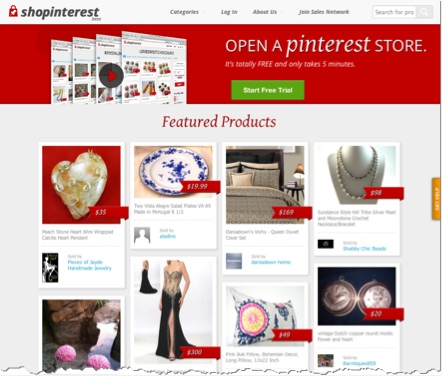
If you are thinking of opening up your own Pinterest store to sell your products, take a look at Shopinterest – you’ll be able to set up shop in a matter of minutes.
3. Check Pinterest Analytics regularly
In order to get the best results, you need to check your analytics regularly. Pinterest offers its own analytics (I’ve found that the stats are not the most up-to-date). This allows you to track how many people have been pinning from your website and how many people have viewed your pins. You can also get a glimpse into what’s trending on Pinterest by checking the “most repinned” list. With this information you can then create better boards and start pinning more relevant pins to your target audience.
4. Make your website “pinnable”
If you want people to start pinning from your website (which is an incredibly efficient way of spreading the word about your business) then you have to make your website and blog very visual. It can be challenging to find unique and “pinnable” images on a regular basis.
Many amateur and professional photographers license their work with the Creative Commons license, which means that you can use theses images so long as you provide credit and don’t use the images for commercial purposes. The great part is that these images are often more interesting and exciting than regular stock photos, while also being free! Make sure that you always give credit where it’s due.
Start by browsing these sites for sources of images:
Flickr (be sure to check the copyright of images)
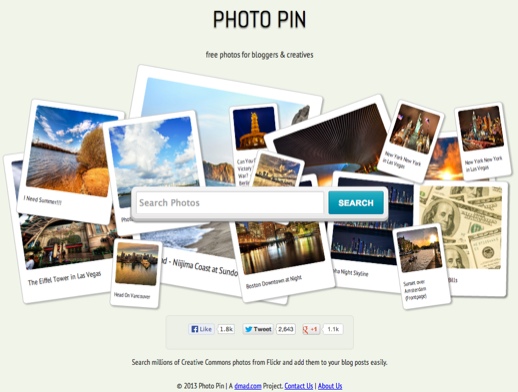
Photo Pin (this site has a terrific selection of Creative Commons licensed images)
For paid royalty-free stock images, check out:
Shutterstock
Fotolia
iStockPhoto
See also these sites for ideas:
Reddit
ICanHasCheezburger - you’ll find an amazing selection of images and you’ll even have a good laugh while searching for the perfect ones for you.
5. Get the ‘goodies’
You’ll find all you need to improve your pinning at Pinterest Goodies. Start by getting the Pin It bookmarklet. This handy tool will enable you to pin ANY image or video that you like on the web.
Another essential goodie is the Pin It button for your own website, which will allow your readers to easily pin anything they like from your website.
I also recommend that you get the Board Widgets so that people will be able to start following your boards directly from your website.
6. Know your audience
As with all other social networks, if you want to raise your engagement you have to do some research in order to understand your audience. You’ll get a feel for what your audience likes to pin and what types of boards they are most interested in. With that information you will then be able to create better boards that your audience will want to follow and share with their friends and followers.
7. Pin to win!
Contests are great promotional tools and Pinterest offers the perfect medium for running a contest. If you’re just starting out on Pinterest and you want to get some likes and followers quickly, then running a contest might be the perfect solution. There are many apps that you can use to run a contest; some of my favorites include Woobox and Votigo. Make sure you read Pinterest’s Terms of Service first so your contest doesn’t end before it’s time.
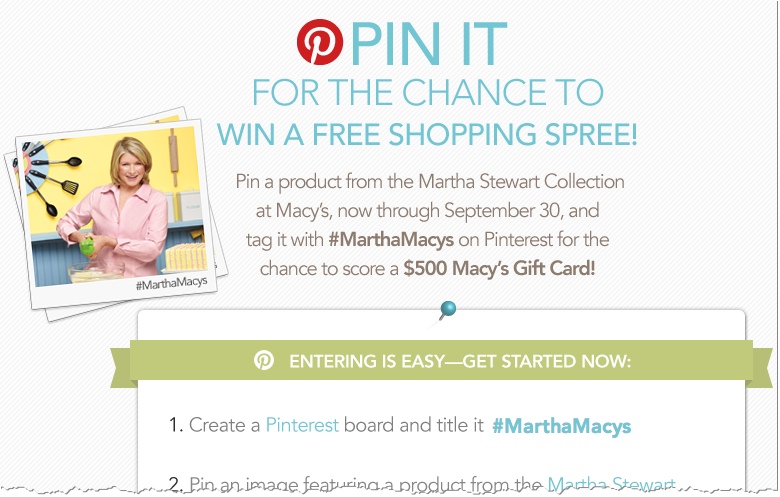
Example Pinterest contest: Martha Stewart Collection at Macy’s
Example Pinterest Contest: Martha Stewart Collection at Macy’s
8. Engage
If you want people to engage with you, then you have to spend some time engaging as well. By regularly liking, commenting and pinning, you stand a much better chance to get more likes and comments from others as well as more followers. Make sure you stay true to your brand and pin only what you feel represents your business well.
9. Create infographics
Infographics are a great way of raising engagement and follower numbers on Pinterest. Among all your pins and repins, some original content–especially educational content–will give you an extra edge. And since Pinterest is mostly visual and image-based, infograhics are the perfect solution. You’ll find plenty great online tools to easily create infographics such as visual.ly or infogr.am.
10. Check out the competition
Checking out the competition is always a good idea so you can get a feel for what you have to do in order to be successful. Start by looking at Nordstrom – currently the most successful brand on Pinterest in terms of followers (over 4.4 million). And, of course, review what your direct competition is doing in terms of creating engagement, gaining followers and getting more leads.
Are you using Pinterest for your business? What results are you seeing? Please feel free to share your experiences in the comments section below – we’d love to hear from you!